Assorted Ocado projects
Updated: Jun 23
Ocado is UK's leading online grocer. It's technology platform is used by a number of international retailers to automate their online operations. The platform includes everything from supply chain planning and delivery management to warehouse troubleshooting and order picking.
I was involved in many areas of the platform. Here is a selection of apps I designed.
Driver Management App
Ocado delivery vans transport groceries to thousands of customers each day. The deliveries are overseen by team managers who support the drivers and help ensure orders arrive on time. While working with the delivery services team, I conducted extensive research to find opportunities to improve delivery performance.
Team managers were shadowed across multiple sites and shifts to capture a broad range of operational contexts. I aimed to understand their responsibilities, tasks, goals, and pain points. The observations and conversations helped build a detailed picture of the operation from business, HR, and IT perspectives. With the insights gathered, I identified inefficiencies and generated ideas for improvement.
With the existing system it took a lot of effort to track drivers and arrivals. Information was fragmented across many screens and not always readily available. The proposed improvement was to help managers ensure all drivers arrived and started their deliveries on time. They would have the opportunity to react more quickly to drivers who were running late or had not yet departed.
Information about delays was not presented in a way that effectively supported decision-making. The proposed improvement was to provide clearer visibility of delays and how they were changing over time. This would help managers identify worsening delays and take action sooner.
While managers wanted to resolve delays, they did not have the tools to do this quickly and efficiently. The proposed improvement was to automatically identify available drivers who could assist delayed drivers.
The design concepts were well received when presented to several driver managers. They recognised the value of the application and believed it could help improve key operational KPIs.


Warehouse management dashboards
These related projects focused on providing operational visibility to different user groups, helping them monitor performance and manage warehouse operations more effectively.
The first project aimed to reduce the time engineering managers spend monitoring warehouse operations metrics and improve overall throughput.
We conducted research with engineering managers across multiple sites and countries, including interviews focused on their workflows and pain points, as well as shadowing sessions to observe day-to-day usage of their data sources. We found that existing tools were fragmented across multiple systems, making it time-consuming to access and interpret relevant information. Secondly, important operational issues were not always surfaced, which made it difficult to respond quickly to important events.
I designed a dashboard that consolidates key information into a single screen, enabling managers to spend less time monitoring metrics while responding more quickly to critical issues.

The aim of the second project is similar to the first one, except the user is an operations manager instead of an engineering operations manager. We conducted interviews with several operations managers across different geographies to understand their responsibilities and goals. A design sprint was carried out to discuss what information would help this user the most and create draft ideas for a dashboard. I took the ideas from this and created a HI-FI draft design.

The third project was to inform and reassure business stakeholders that the operation was running smoothly. We came up with the ideas of the designs in the same design sprint. I refined the best ideas into this draft design.

Automated messages app
This is an app for managing automated messages that customers receive when they take certain actions. E.g. Creating an account, or checking out an order.


One of the less visible UX achievements in this project was the improvement of the placeholder names. They were previously difficult to understand, inconsistent, extremely long, and ambiguous. I collaborated with a member of the technical communications team to create better categories and naming conventions, removing duplicates, reducing length, and making everything simpler and clearer. My technical communications colleague said it was the best work he had been involved in at Ocado.
Warehouse viewer
This is an app that warehouse operators use to view robots that they are troubleshooting remotely.
I designed several improvements to the existing app and did some onsite usability testing with the end users.
The new design had a much bigger image, unneeded information was removed, less often used functionalities were hidden. I introduced a mini map that provides an easy way to switch to nearby cameras.


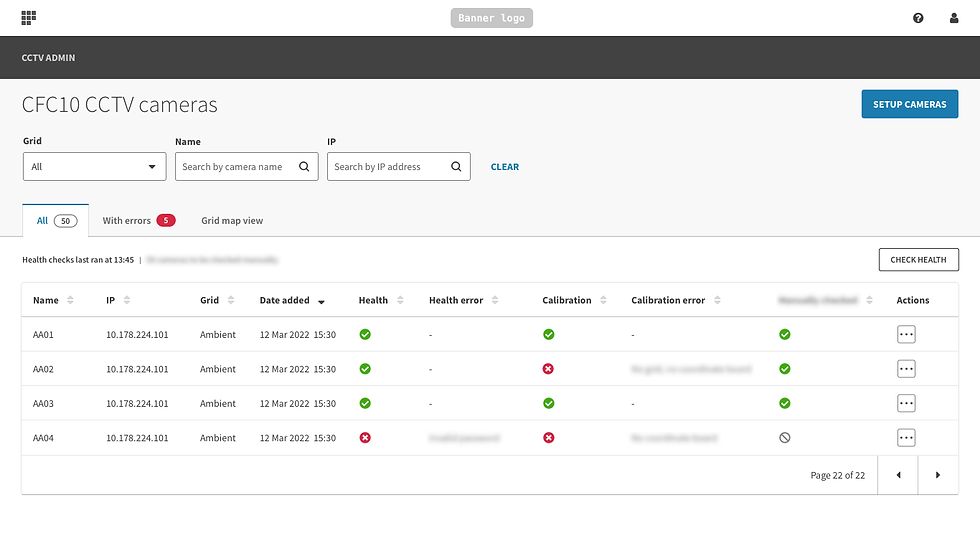
Camera setup app
This is an app that automates the time consuming process of calibrating cameras.


Simulation management app (LO-FI)
Ocado use simulations to find the most optimal way of running a warehouse. I had an opportunity to improve the UX of this highly technical tool when the team planned to rework it.

I redesigned several parts of the UI, including:
A new information architecture
Reduced learning curve for new users
Clearer representation of key information
Fixes for many pain points
Due to a departmental reorganisation I didn't get as far as creating the high fidelity designs. Here are the wireframes I created.