E-learning experience

Today more and more people are signing up to e-learning courses to gain the skills they need to advance their careers. To help save time, Filtered.com created a unique service that tailors course materials to each individual’s personal needs and knowledge. In this project I helped Filtered.com create an improved multi-device learner experience.
MY ROLE
On this project I worked as a UX team of one, collaborating with business stakeholders and developers.
THE CHALLENGE
Filtered wanted to create an improved user experience for its e-learning webapp. There were two main objectives.
Improve the usability of the e-learning webapp
Increase learner engagement with the courses

THE RESEARCH
Qualitative Survey
Before this project began, Filtered sent out a survey to its customers to find out their opinions about their e-learning experiences. After analysing hundreds of comments people wrote, I learnt a great deal about people’s needs, circumstances and pain points.
Here are some interesting examples:
People want to do the course wherever convenient for them: at work, at home, or when travelling.
When at home or travelling on public transport, people want to use their tablets or ebook readers to do the course.
People felt the course certificate was too easy to get.
Some people struggle to find the time to do the course for reasons beyond their control.
People want to interact with other learners and the course author.
Some people found the course UI to be difficult to use.
Log Data Analysis
When people do the course, their every click is recorded by the app. I analysed these logs to learn about people’s course usage patterns. The finding included what proportion of the course people completed, when and how regularly people did the course, and how people navigated around the course, etc.
The customer survey revealed that some learners struggled to find the time to do the course. This was backed up by the analytics data, which showed that most learners manage to do some of the course, but don’t go on to complete the rest of it. Only a small minority manage to finish more than 90% of the course(s) they signed up to. A significant number of learners only manage to complete a few lessons or don’t even start the course.
Stakeholder Workshop
The stakeholders at Filtered had been working in the business for more than 2 years. They knew some of the product’s weaknesses very well, and had ideas about how to improve the product. I ran a crazy 8s workshop with them where they could share and discuss their thoughts.
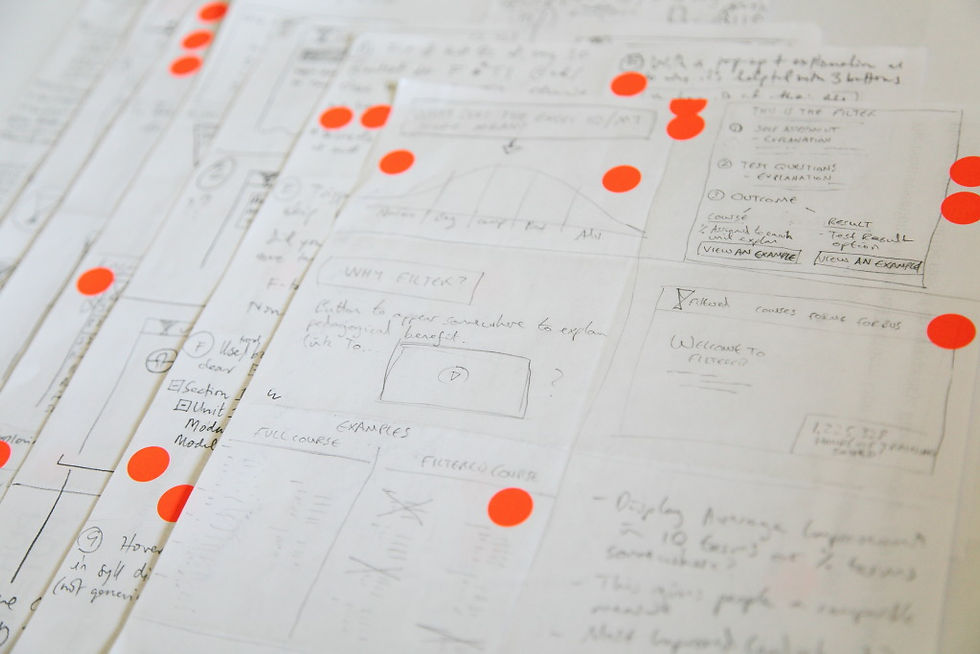
Some of the problems we identified and tried to solve in the workshop included:
Many people are not working through the course in the recommended way.
People are skipping questionnaire questions because they are not currently compulsory.
Features that are unfamiliar to learners lack a good explanation / introduction.
The visualisation of the course syllabus, lessons and statuses should be improved.
Showing the amount of time it takes to complete a lesson is highly beneficial.
REDESIGNING THE USER INTERFACE
Reduce Cognitive Load
Reducing the amount of unnecessary cognitive effort needed to use an interface is one of the best known usability principles. In Dorian Peters’ book Interface Design for Learning, she explains that this also applies to e-learning. The more of the brain the user has to allocate to the interface, the less is available for learning.

In Filtered’s original e-learning webapp, there were some unneeded UI elements. On the LHS of the screen, there was a grey panel that displayed the course title and a grid that listed all the lessons (shown below). However, neither are necessary while focusing on the course material. The complex and contrasty grid is more distracting than helpful when you're learning. Furthermore, all of the information in the LHS panel are there permanently - you can't get rid of it by scrolling down.

In the redesigned UI, I removed the LHS panel entirely. All necessary information and controls are moved into the top navigation bar. The top half of the navigation bar contains the logo, links to other parts of the webapp, as well as the user profile. But none this information is needed when learning. So when the learner scrolls up, the top half becomes hidden, leaving just the bottom half visible.


Text Legibility
In the original e-learning webapp, the course text was not easy to read. There were two reasons for this. First, the font size was small. And second, there were too many characters per line.
In our survey I found that many retired people did e-learning as a hobby in their spare time, and some of them felt the course text was too small to read. Usability expert Jakob Nielsen recommends a font size of 12pt, or 16px, for senior citizens. Unfortunately the 14px font size in the original course text was below this recommended size.
In the redesign, I decided to use a font-size of 16px (12pt) for tablets and phones. But on larger screens like laptops or PCs, when the viewport goes beyond 1280px, I increase the font size to 18px. This is to take advantage of the extra real estate on these larger screens.
In the original course text, the number of character per line was 110. According to research by Mary Dyson (2004), 100 characters per line is the optimal length for on-screen reading speed; but people prefer a shorter length of between 45 to 72 characters. So, I decided to reduce the line length to 85 characters per line - a compromise between optimal reading speed and perceived ease of reading.


Course Feedback
As mentioned at the beginning, Filtered tailors the course material to each individual’s needs and knowledge. It does this by first gathering feedback from learners about which course modules they found to be most useful. It then uses machine learning to recommend course modules that learners with similar needs and knowledge have found useful.
For the module recommendation algorithm to work well, a large quantity of learner feedback needed to be gathered. The larger the amount of feedback, the better the recommendation.
Unfortunately, there were two problems with the learner feedback UI.
It made the course navigation unintuitive. The navigation controls were not visible until the feedback buttons were clicked. (Learners complained that the navigation was complicated and difficult.)
Leaners did not know why the feedback was asked for, and how it was used.
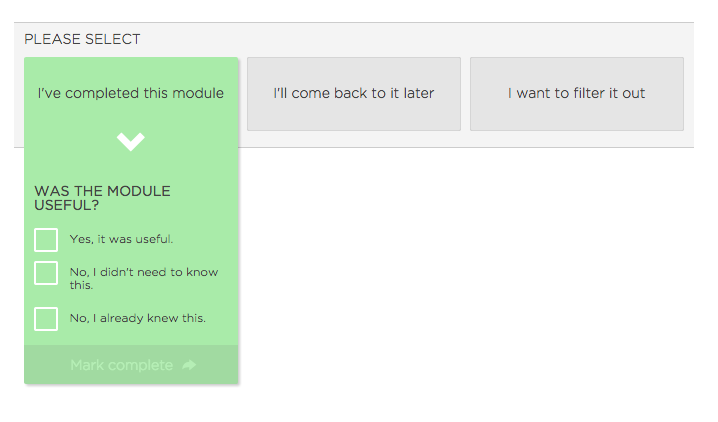

In my redesign, the feedback controls are simplified to just two questions. The navigation arrows are shown permanently. An information link in the corner allows the learner to easily find out why the feedback is being gathered, and how it helps.


Presenting the Tailored Course.
After a course has been tailored to your individual needs, the course modules that you don't need to learn are said to be 'Filtered out' (branding parlance). However, a big problem with the original app was the lack of clarity about which modules were filtered out.
The only way to know was by hovering your mouse over tiny grey squares in the unintuitive module grid. In the redesigned course home page, modules are presented in an easy to scan list. The modules that are filtered out are shown in a lower contrast grey colour, and are labelled with the text 'Filtered out' along with a 'filter' icon. If the learner wants to ignore the filtered out modules, they can be hidden with a toggle control.
A second problem with the original app was that learners weren't always providing the data the app needed to tailor the course for them. Before starting the course, Filtered recommends a questionnaire and a test to be completed. And after completing the course, they recommend that a second test be taken. All of these help to improve the learners experience and well as gather valuable data for the company.
In the redesign, I created the My Learning Plan section, which guides the learner in very clear steps how the course should be used.


Learning while Travelling
I learnt from the survey results that a lot learners have full time jobs, who must find time for learning outside of working hours. Many people said they struggled to find time, and were unable to complete the course. The difficulty in finding time was one of the major themes from the research.
One solution could be to make the course more easily accessible to people while they are travelling. In fact, in the survey many people said they wanted to learn while travelling. Today it’s common to see people pass the time on their smartphones or tablets while sitting on the bus, train or tube.
Commuter using tablet
The first step is to create a responsive website that works well on desktop, tablet and mobile. However, mobile reception isn't always reliable or available on public transport. The mobile signal might be weak on some train journeys, and in London, tube commuters receive no mobile reception at all. So the second step is to create an App that allows the course to be accessed offline.

Today more and more jobs require people to look at computer screens all day. In the survey, several people said their eyes were tired after a long day staring at a screen. Having to look at another screen full of text when your eyes are tired is hard. But when your eyes are tired, your ears may not be. An audio recording of the course could work well for commuters with tired eyes. There is plenty of evidence that people like to listen to audio material. The popularity of audio books and podcasts are two examples.
That said, audio isn’t suitable for all courses. The courses that are visual in natural, like Excel or Powerpoint courses, won’t work well in audio. With such courses, you need to look at screenshots when the course material refers to certain objects on the screen. Still there are plenty of courses that are non-visual in nature, and could work well in audio, e.g. communication skills, leadership skills.

THE RESULTS
The first version of the UI redesign was very well received by the business stakeholders. I walked the development team through the wireframes to ensure they understood the UI and interactions in detail. The team has planned to start building the new UI later in the year.

Appendix: future improvements
Social Learning
During the research I discovered that many learners wanted to interact with course authors as well as fellow learners. According to social constructivism and situated learning theories, learning is inseparable from its social context. Russian psychologist Lev Vygotsky believes learners can solve far more complex problems with others than they could alone. I believe social learning will provide learners with a richer learning experience, where they will be able to learn more effectively than studying the course material alone.
One way to enable social learning is to have a discussion forum where learners can engage with other learners and course tutors. The best answers to questions can be upvoted, causing them to move to the top. Learners can be awarded points for answering questions in the forum. And the more upvoted their answers, the more points they get. Points can be exchanged for rewards, such as extra course materials or free access to other courses.
Where appropriate the app can encourage discussions by posting open-ended questions for learners to answer, sparking off lively discussions with fellow learners.
Activist Learners
Two experts in learning, Peter Honey and Alan Mumford, identified four distinct learning styles or preferences: Activist, Theorist, Pragmatist and Reflector. Activists like to learn by doing. They need to get their hands dirty, to dive in with both feet first.
However, the Activists' needs are not well supported currently. Not all lessons have a practical exercise at the end. And sometimes the practical exercise can be too short. This means Activists are not able to learn in the way the prefer. A lot of people complained in the survey about the lack of practical exercises, and suggested more exercises be added. To support the Activists' learning style, we should ensure there are enough practical exercises at the end of each lesson.
Time Management
I discovered in the survey that a lot learners struggled to find time to complete the course. One solution could be a personal calender where learners can set up a learning schedule. This lets people commit to completing realistic learning objectives by certain dates. When people commit to something, they are more likely to do it. If the learner falls behind schedule, they will receive an email in their inbox, reminding them of the commitment they had made.
Gamification
There is a lot of evidence that gamification make things more fun and engaging. Here are some of the ways the e-learning app can be gamified.
Getting points for completing exercises correctly. After enough points are accumulated rewards are unlocked. Rewards can be bonus exercises and answers, cheat sheets, info-graphics, bonus E-book on a related subject, or vouchers for other courses.
Leader boards let learners compete against other learners worldwide, or just those from their organisation. Here are a few different types of leaderboards:
Points gained from answering exercises correctly.
Final course test score.
Fastest time to complete the course.
Most questions answered and upvoted in the forum.
Creating mini games related to the course material, e.g. crosswords or word searches.
For corporate learners, real-time games can be created for groups of learners to complete against one another like on a TV game show. Here are some examples:
Teams try to answer as many questions right as possible in a certain amount of time.
Teams take turns to answer questions. A team can continue to answer questions as long as they keep giving the right answer. But when a wrong answer is given, the team loses their turn, and the other team gets to answer the next questions.


